
In the modern AEC industry, reality capture technologies like laser scanning and photogrammetry have transformed how the built environments are documented. Two primary deliverables from such capture processes are Scan to CAD Conversion Services and full Scan to BIM Services. While both start from the same digital point cloud, they serve fundamentally different project needs.
Knowing when to select one over the other can save time, reduce costs and prevents unnecessary complexity. This blog explores the technical triggers and practical factors that helps in making informed decision.
What Are Scan to CAD and Scan to BIM?
Scan to CAD Conversion Services
This process produces 2D drawings or 3D CAD models (e.g., DWG/DXF formats) directly from the point clouds captured via 3D laser scanning or photogrammetric methods. The output typically consists of:
- As-built floor plans
- Elevations
- Sections
- Simple 3D geometry without BIM intelligence
Use case focus: documentation, fabrication drawings, MEP coordination in CAD, architectural records.
Scan to BIM is a higher-value deliverable where the point clouds are processed into an Intelligent Building Information Model (Revit/IFC), including:
- Parametric families
- Element metadata (material, thickness, performance)
- Schedules and classifications (IFC/COBie)
- Clash detection readiness
- Lifecycle asset data
Use case focus: renovation planning, facility management, performance simulations, construction execution.
Deciding Factors: When to Choose Scan to CAD
Here are the scenarios where Scan to CAD may be the better, more efficient and more cost-effective choice than a full Scan to BIM:
- Project Scope Is Documentation or Retrofits Only
If the primary need is as-built documentation, measurement verification or shop drawings, Scan to CAD meets the requirements without adding any unnecessary BIM complexity.
Example:
- Civil or mechanical contractor requires accurate layouts of existing pipe racks for fabrication.
- Architectural firms needs existing plan drawings to design the minor interior renovations.
In these cases, CAD deliverables can achieve the goal at a fraction of the time and cost of full BIM.
- Budget Constraints Are a Priority
Scan to BIM projects typically cost 30–150% more than the Scan to CAD because of the increased modeling efforts, object classification and verification required.
- CAD deliverables often require point cloud modeling of geometry only.
- BIM models need parametric objects, level of detail (LOD) requirements along with the validation routines.
When the project budget is limited but accuracy is essential, Scan to CAD offers the best balance of precision and cost.
- Simplicity of the Structure or System
For simple geometries—like industrial sheds, warehouses or open structures with minimal architectural intricacies—Scan to CAD is often sufficient.
Why?
- Few parametric elements to model
- Low requirement for metadata or schedules
Here, the engineering team benefits from speed without the overhead of intelligent modeling.
- Tight Project Timelines
Scan to CAD workflows are faster because they model only the necessary geometric outlines and do not require any object intelligence or detailed metadata preparation.
Typical turnaround comparisons:
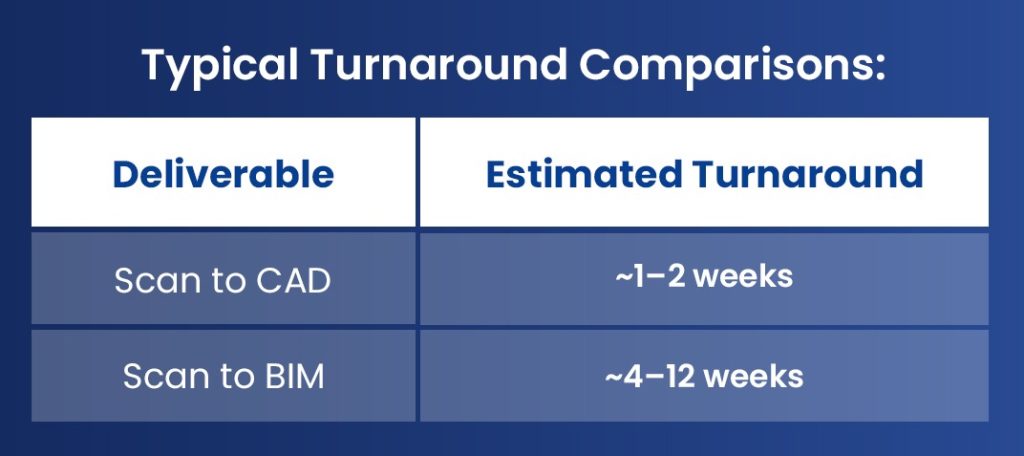
When deadlines are compressed, CAD deliverables helps to maintain project velocity.
- Downstream Team Uses CAD-Centric Software
If the stakeholders primarily use AutoCAD, MicroStation or other CAD-based environments, Scan to CAD aligns with the established workflows and reduces the friction.
Most civil, structural detailing and fabrication shops still prefers CAD formats over BIM for daily operations.
- Data Consumption and File Size
Point cloud data is massive—often reaching 50–300 GB per large facility scan set.
- Scan to CAD reduces the deliverable weight by simplifying the geometry.
- Full BIM models carry large intelligent families and metadata, increasing the file size and compute the demands.
Smaller files are easier to distribute and collaborate on, especially where the bandwidth is limited.
When Scan to BIM Is Still Necessary
Even though this blog focuses on when to choose Scan to CAD, it’s important to recognize situations where full BIM is indispensable:
✔ Facilities needing detailed asset management
✔ Complex MEP systems requiring clash detection
✔ Regulatory compliance scenarios (COBie/IFC deliverables)
✔ Projects requiring performance analysis (energy, daylighting, thermal)
✔ Long-term operations planning and FM integration
In such cases, the value of Scan to BIM far outweighs the investment.
Real-World Case Study Snapshot
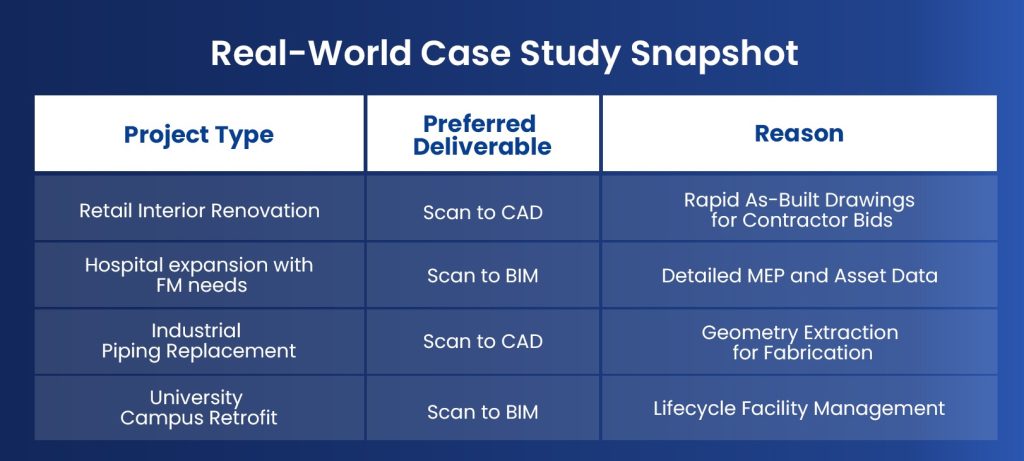
These examples demonstrates the practical decision pathways based on the project objectives—not the technology hype.
Conclusion
Choosing between Scan to CAD and Scan to BIM is not binary. It depends totally on the project goals, budgets, timelines, technical requirements as well as on the software ecosystems employed.
Choose Scan to CAD when:
- You need geometric accuracy without metadata
- Budget or time constraints exists
- Stakeholders favors CAD workflows
- The structure or system is simple
Choose Scan to BIM when:
- Intelligent modeling and data are required
- Facility lifecycle planning is in scope
- Analysis and simulation workflows are intended
By aligning deliverables with the project needs right from the start, the teams can avoid the waste, reduce the reworks and unlock higher value from reality capture investments.